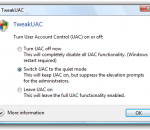
TweakUAC™ gives you more control of the Windows Vista UAC settings. In addition to enabling or disabling the UAC, TweakUAC also allows you to select the “quiet” mode for UAC. In “quiet” mode, the security of UAC is fully enabled, except that if you use Windows as an administrator, you will not see the usual UAC prompts to approve actions that require the administrative rights. UAC is short for User Account Control, it’s a security technology available in Windows Vista and Windows 7 that keeps programs from performing privileged operations without special approval from you. On the right is a typical message displayed by UAC when you attempt to run a program that requires special permissions.
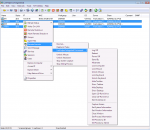
LanHelper is a powerful Local Area Network (LAN) management, discovery and monitoring tool for office network and home network. No any server side program needed. LanHelper has a smart and fast scan engine which can find IP address, MAC address, SNMP, NetBIOS, etc on LAN & WAN. With group feature and XML, managing machine data is very easy in LanHelper. LanHelper provides HTML and XML modes to view machine data with web browser in a more detailed and convenient way. Without installing any server side program, you would find the network management is easier by using LanHelper. Wake-On-LAN function sends Wake-On-LAN commands (Magic Packet) to power on computers on LAN or WAN. Support schedule and service. Remote Shutdown function shuts down or reboots remote computers on local network, support local schedule. Remote Execute allows you to schedule tasks to run periodically or at a later time on remote computers. LanHelper Integrated Command, which is designed for Remote Execute, offers many additional management functions for network administrators, such as obtain software & hardware information, lock mouse, lock keyboard, capture screen and kill process at regular intervals, etc. Service management allows you to view service, start & stop service, install service and more. LanHelper checks whether computers are online or offline, and detect whether computer names or IP addresses have been modified. LanHelper can also monitoring the computers in your network for availability, if the program finds remote computers have been down or have been online, it will notify the network administrator immediately, or automatically perform shutdown & Wake-On-LAN operations. FEATURES: · Provide IP scanner & LAN scanner for high speed scanning and quickly collecting machine data, and it's easy to manage the machine data with XML and groups features. · Monitoring the servers & workstations in your LAN/WAN for availability. Once failure or problem is detected, LanHelper will alert the network administrator immediately, or automatically perform Wake-On-LAN & shutdown actions. · Wake-On-LAN. Send "Wake-On-LAN" commands to remote computers. You can easily power on PCs located on other rooms or offices. Schedule and service supported. · Shut down or reboot large number of computers in high speed on LAN. Schedule supported. · Users management. Batch methods available for fast management. · Groups management. Batch methods available for fast management · Make the remote computer execute command, run program or open other files. · Services management. Batch methods available for fast management · Open files management. · Sessions management. · Send text messages to other users. Provide many batch send methods. · Network Interface Card vendor identifier. · Realtime logs for most of operations. Greatly helpful for LAN administrators to find and solve network problems. · No server program needed. You don't have to install any serve program on remote computers.
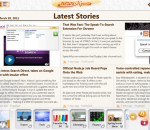
Considering more consumers nowadays are showing interests on acquiring latest technology devices, esobi Inc. introduces you with the latest product - newsXpresso Premium, boost in visual design with multiple theme skins and smooth finger navigation along with a more intuitive reading approach, easy SNS sharing, and efficient tag management. Bringing relaxation and intuition to your daily news reading routine is our goal. With Latest Stories, users are able to read through the most updated news from subscribed channels either in Newspaper Layout (mimicking the look-and-feel of printed newspaper) or Catalogue Layout (side by side presentation). In My Channels, all your subscribed channels along with tags are listed like an index, it not only shows the title, status, and two latest news of your feed channels, but also lets you make modifications to fit your reading custom. If you would like to gather favorite news in one place, My Favorites is the feature you are looking for; it let you drag any liked news for storing, and it gets better, the text/images will be saved at the same time for offline viewing. To share liked news to your pals, simply drag to share to well-known social network sites such as Facebook and Twitter! Implementing powerful functions is a good publicizing intention, but esobi Inc. is even more thoughtful, we believe having resourceful content and providing our users with feed search service will bring news reading more convenience and pleasant. In Newsstand, user is able to perform feed search powered by Google, and once-click to subscribe the preferred news feeds to My Channels. More feeds been subscribed meaning the demand for efficient managing approach is raising. newsXpresso Premium offers three kinds of management - Channel Tag, Favorite Tag, and Filter Tag. These tag managements allows users to store and locate content based on preference immediately. We strongly suggest you to try it today!
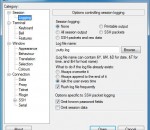
PuTTY is a free implementation of Telnet and SSH for Windows and Unix platforms, along with an xterm terminal emulator. PuTTY 0.63 is out, after over four years (sorry!), with new features, bug fixes, and compatibility updates for Windows 7 and various SSH server software. LEGAL WARNING: Use of PuTTY, PSCP, PSFTP and Plink is illegal in countries where encryption is outlawed. I believe it is legal to use PuTTY, PSCP, PSFTP and Plink in England and Wales and in many other countries, but I am not a lawyer and so if in doubt you should seek legal advice before downloading it. You may find this site useful (it's a survey of cryptography laws in many countries) but I can't vouch for its correctness. Use of the Telnet-only binary (PuTTYtel) is unrestricted by any cryptography laws. Several users have pointed out to us recently that the top Google hit for "putty" is now not the official PuTTY site but a mirror that used to be listed on our Mirrors page. The official PuTTY web page is still where it has always been: Using this type of interface, there is no need for you to be sitting at the same machine you are typing commands to. The commands, and responses, can be sent over a network, so you can sit at one computer and give commands to another one, or even to more than one. SSH, Telnet and Rlogin are _network protocols_ that allow you to do this. On the computer you sit at, you run a _client_, which makes a network connection to the other computer (the _server_). The network connection carries your keystrokes and commands from the client to the server, and carries the server's responses back to you. These protocols can also be used for other types of keyboard-based interactive session. In particular, there are a lot of bulletin boards, talker systems and MUDs (Multi-User Dungeons) which support access using Telnet. There are even a few that support SSH.
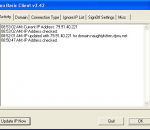
Dynu Basic Dynamic DNS client uses true dynamic DNS client/server technology to fix a static domain name to a dynamic IP address. While this service is free, it allows Internet users with modems to host Web, FTP, mail and game servers, or other TCP/IP services from a home PC.If you have a cable modem, xDSL, ISDN or Dialup, this is a great way to host your own Web, FTP, Mail Server, Game Server or other TCP/IP Service. Get your own domain like yourname.dynu.com. Your domain name's dynamic IP address is automatically tracked by Dynu Client which is available for download free of charge. Host your own website at yourname.dynu.com!! Host your own FTP, Email, Telnet, Chat server and more right on your computer. No internic charges or any other charges will apply and you will get your own personalized domain name. Get started by registering your domain name and then download and run the Dynu Basic Client now!
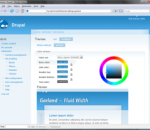
BitNami Drupal Stack greatly simplifies the deployment of Drupal and its required dependencies. It can be deployed using a native installer, as a virtual machine, in the cloud or as a module over an already installed infrastructure Stack. Drupal is a content management platform that allows an individual or community of users to easily publish, manage, and organize a wide variety of content on a website. In general, Drupal is used for community web portals, discussion sites, corporate web sites, intranet applications, personal web sites or blogs, aficionado sites, e-commerce applications, resource directories, and social networking sites. Drupal is easy to extend by plugging in one or more of the dozens of freely available modules.
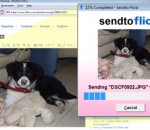
Right click any image then select "Send to Flickr" to easily upload photos to your Flickr account. Sendto Flickr can be used with any image or photo stored on your computer, over a network or even on removable drives. * Adds "Flickr" to the "Send to" list in Windows * Uploads photos from your computer, memory cards or network drives to Flickr * Preview files as they are being uploaded * Upload multiple files at once * Links directly with your Flickr account * No browser required * Best of all, it's free
Webuild is a tool to build websites. It allows you to generate a full website making use of advanced HTML5, JavaScript and Ajax effects in just one click, with the help of a Webuild script and some templates. You don't have to know anything about HTML5 and Ajax programming as some templates are already provided by Webuild. Webuild automates a lot of steps such as listing images, screenshots, and avoids you the hassle to maintain a website when only one resource has changed but this resource is used in all your pages.
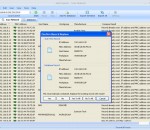
Trogon MAC Scanner is a necessary tool for efficient network administration and network maintaince. You will always know which computers and other network devices connected to the network, who are used them and where they are located. Trogon MAC Scanner automatic compare scan results with database and indicate new or changed hosts and you can immediately detect illegal access to the network. You can save scan results database to the file for future network monitoring and maintenance. Trogon MAC Scanner scan local network and detect IP addresses and MAC addresses for every network devices. Also find additional attributes: host name, workgroup, network adapter manufacturer. Trogon MAC Scanner use ARP protocol for scan subnet and use multithreading for simultaneous a large number of queries send out. This allows scan network incredible fast. If your computer connected with a several subnets, you can select any for scan. Features: Scan and list IP addresses and MAC addresses of all the network devices. Scan local network, find all network devices, detect their IP addresses and MAC addresses and list these addresses in pairs. Just a few seconds and you will get information about all connections to the network Save scan results into the database. After scan is finished you can add scan results to the database. When results has been added to the database you can edit records. Also the database will used for comparison with future scan results and detection new connections or any other changes in your subnet. Scan results can be saved for future reference and maintenance. Edit database records, add attributes (user name, location) to any record. When scan results has been added, you can add more details for any computer in the network. For every network device you can indicate where his physical location and who is his owner and any comments. Trogon MAC Scanner allows set attributes: host name, workgroup, user name, location, comments. It is enable to create new records manually (without scan) and change IP addresses and MAC addresses for an existed records. You will always have information for efficient network management about users and devices in your network. Automatic compare scan results with database records and indicate difference. Automatic comparison of the scan results and the database records indicate changes in your local network. You can immediately detect unauthorized IP addresses or MAC addresses modifications and illegal access to the network. Also you can always add new devices without manual addresses entering. Click record marked as changed and get comparison details contains databases and new addresses. Automatic addresses comparison always started after every scan. Export and Import database in file formats (txt, xml, csv). Trogon MAC Scanner can export scan results to the file (support formats are TXT, CSV, XML) for future usage and import records from file to the database. You can export some selected records or the entire database.
This FREE tool for SharePoint (WSS 3.0, MOSS 2007, SharePoint Foundation 2010, SharePoint Server 2010, SharePoint Foundation 2013, SharePoint Server 2013) allows you to execute classic sql query using lists and document libraries like simple tables. You can perform SELECT, INSERT, UPDATE, DELETE and "cross sub-site" JOIN!!
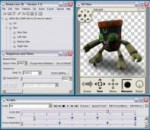
The revolution begins here with Strata Live 3D CX 2. Put realtime 3D in front of your clients and customers. Strata Live 3D CX makes it easy to prep your models, add interactivity, then output to the web and PDF. YouTube style embedding is easy with the new cloud hosting option. Just use the simple "Export to Web" command. This revolution will be online and in 3D. YouTube style hosting - 3D in the cloud Get your models online quickly and easily using Strata Live 3D's cloud hosting option. Just like YouTube, you get your own account to upload your models to. It's as easy as selecting "Export to Web" from the Live 3D application. With your 3D content online you can then set options for displaying that content, like shadows, auto-rotate behavior, display size and more. You can then direct clients to your own gallery on StrataLive3D.com. YouTube style embedding - get online easy Like YouTube videos, once you have your 3D model uploaded to StrataLive3D.com you can easily embed the content into your own website, a client's website - or pretty much anywhere else content can be used. Just use the supplied embed code to place the Live 3D model right where you want it. Content from anywhere - including the Strata 3D CX Suite Bring in models from virtually any 3D application using the universal VRML file format. Models can even include animations for creating interactive objects. And with the Strata 3D CX Suite you can use models captured from photographs using Foto 3D, packaging models created using Enfold 3D - and anything else you can dream-up using Design 3D. Powerful tools for polygon reduction and authoring Getting your models ready for realtime presentation requires some key technology - and Strata Live 3D has it. This includes polygon reduction technology for getting large models down to size and compression algorythms designed for 3D models. Add that to an easy to use, no scripting necessary authoring system and Live 3D gives you the tools you need to go from simple presentations to complex simulations. Want a powerful scripting language? That's in there too.
Maryfi is a free and easy to use software router for Windows 7, 8 , and 8.1 computers. With Maryfi, users can wirelessly share any Internet connection such as: a cable modem, a cellular card, or even another Wi-Fi network. Other Wi-Fi enabled devices including laptops, smart phones, music players, and gaming systems can see and join your Maryfi hotspot just like any other Wi-Fi access point and are kept safe and secure by password-protected WPA2 Encryption.