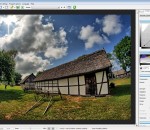
With easyHDR, get your digital photos closer to what you've seen with your own eyes. Say goodbye to unwanted over- and underexposures. You will get neat results even if the photos are taken in very difficult lighting conditions. EasyHDR is an image processing software that produces and tone maps High Dynamic Range images. The HDR is produced out of a sequence of photos taken with different exposure settings. It has to be tone mapped, so it can be displayed on a computer screen or printed. It is possible to produce realistic or dramatic looking results. If the photos are taken hand-held (without a tripod) the photo alignment tool (automatic as well as manual) can be used. It compensates even for perspective misalignment. Manual and automatic ghost removal allows fixing problems with moving people, cars, trees, etc. You got maximum control on the tone mapping process by having live preview of a photo at full resolution. You see what you get. The program is capable of importing various file formats: JPEG, TIFF, PNG, FITS (used in astrophotography cameras), Radiance RGBE, OpenEXR and nearly all digital camera RAW formats, by all vendors. There is also a plug-in allowing integration with Adobe Lightroom. If you have hundreds of photos to process you'll also find batch processing very useful. Just create a task list, start processing and wait for the results.
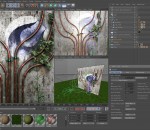
Easy to Use, Professional 3D Animation Software The next generation, representing two decades of excellence. The eleventh generation of CINEMA 4D is another milestone in the development of professional 3D software and a testament to two decades of excellence by MAXON's programming team. Professional 3D animation tools have never been easier to use. The Easiest-to-Use 3D Application CINEMA 4D's intuitive interface and logical workflow make it possible for those new to 3D artistry to dive in and be productive quickly. Feedback is smooth and interactive so you can let your creativity run free. State-of-the-Art Technology CINEMA 4D's state-of-the-art architecture means it is always the first to benefit from new technologies and advancements: 64-bit support on Windows and Mac OS or Multiprocessing to name a few. MAXON is a development partner of many leading IT companies, including Intel and Apple. As such MAXON has early access to many future technologies which makes it possible to tailor our products accordingly. Our customers can rely on the latest technology and maximum security for their investment. Modularity Makes it Suitable for all Industries. The core application contains everything you need to create high-end 3D images and animations. For those artists whose work demands more than the basic application, MAXON provides numerous seamlessly-integrated modules. Modules can also be purchased individually or in affordable bundles. For industries such as architecture and engineering, MAXON also offers Editions that contain specially-tailored functionality. There is a CINEMA 4D to satisfy the needs of every artist and industry that utilizes 3D graphics. Take a tour through our solutions pages to see where CINEMA 4D dominates and thrives worldwide - then download a demo version and convince yourself.
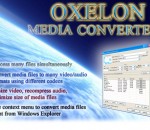
Convert between most known video files: AVI, MPEG, DVD, WMV, 3GP, FLV & more. Rip and burn videos to DVD.
GOM Player is a free multimedia player with popular video and audio codecs built-in. GOM Player supports file formats such as AVI, DAT, MPEG, DivX, XviD, WMV, ASF. Users don't have to install codecs separately. GOM Player is capable of playing incomplete or damaged AVI files by skipping the damaged frames. It can also play locked or partially downloaded files. Its other features include drag-and-drop support, HTTP streaming, editable skins, subtitling, overlay mixer, key remapping, enhanced filter rendering, real-time index rebuilding for AVI files and unicode support among others. GOM Media Player Features: Codec Finder GOM Player includes many codecs (XviD, DivX, FLV1, AC3, OGG, MP4, H263 and more) so you won't need to install separate codecs for most videos. For those videos that require a separate codec, GOM Player will find one and direct you to a place where you can download an open source version of the codec. That way, you won't get stuck with unnecessary codecs on your system. Play Broken AVI Files (Patented) AVI files can't be played if the index is broken, or if the file isn't completely downloaded. This is because the index is located at the end of the file. GOM Player's patented technology enables users to view files with broken indexes or that are still being downloaded. Powerful Subtitle Support GOM Player supports SMI, SRT, RT, SUB(with IDX) files for subtitle. You can specify margin, location, size, resolution, font and others. You can also enable shadow, view ASF files with subtitle, karaoke subtitle mode. You can even synchronize subtitle and video if there's any mismatch. Convenient Playlist If you run a video file and there is already a file with a similar name in the directory, it will be automatically added to your playlist. GOM Player has a similar playlist format as M3U, PLS, ASX and you can also include and edit different media formats on that playlist as well. It's easy to create and edit your own multimedia playlist with GOM Player. Support Different Media Types Along with different media format such as AVI, MPG, MPEG and DAT, GOM Player also supports streaming Windows media format (WMV, ASF, ASX). You can also watch DVD-quality videos with 5.1 channel audio output. Screen Capture Screen capture allows you to take a screenshot of your video directly from GOM Player. Using the Burst Capture feature, you can take continuous screenshots up to 999 shots. Advanced Features There are an endless number of advanced features. Customize brightness, contrast and saturation. Sharpen and add noise to your video. Try the audio equalizer. Repeat a section of your video with our A-B Repeat feature. Fast forward/rewind a few seconds using left/right keys. And much more for you to discover!
DVD43 is a free DVD decrypter that runs in the background and decrypts DVDs on the fly. This website gives you some basic information, like what it does, how to use it, and where to download it. If your copy program needs a decrypter, you can use DVD43. It's free, so you won't need to waste money on a decrypter. This website does not host the DVD43 setup file and is not affiliated with the authors of DVD43, but it does provide safe links to the program. WHAT DOES IT DO?: DVD43 will decrypt (unlock) a movie DVD so that your copy program can read it. If the DVD structure is non standard or the DVD contains bad sectors, your copy program needs to take care of that. Outdated copy software like DVDXCopy can't handle bad sectors commonly found on newer DVDs. You need a copy program that provides frequent updates to handle new movies as they are released. I have included a list of programs (at the bottom of this page) which are compatible with DVD43. Only one (1Click DVD Copy) was able to copy all the DVDs I tested without errors.
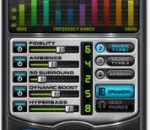
DFX is the best audio enhancer to improve the sound quality of MP3, Windows Media, Internet radio, and other music files on your PC. You can select from these DFX player version: DFX for Windows Media Player DFX for RealPlayer DFX for J. River Media Center DFX for Winamp DFX for Musicmatch Jukebox DFX for Yahoo! Music Jukebox DFX for DivX Player Features: ·DFX dramatically improves the sound quality of your favorite media players with 3D Surround, higher fidelity, booming bass and more, providing exceptional playback quality on your PC. The latest version includes a new Explore feature which provides you with quick access to music videos, song lyrics, similar artists, and more. Learn more about DFX features below: * ? Easy To Use and Customizable * ? Advanced DSP Sound Quality Enhancement * ? Explore Artist Videos, Bio, News, Lyrics, Similar Artists New * ? Speakers and Headphones Optimization * ? Finely-tuned Music Presets * ? Dynamic Sound Spectrum Analyzer * ? Powerful Audio Processing Modes * ? Compatible With Many Players and Media Formats Improved * ? Efficient Performance Using Minimal CPU * ? Stylish, Shapely Skins Updated * ? Space Saving Mini-mode Interface Updated * ? Presets Backup and Restore * ? Preset Song Associations Improved * ? 5.1/7.1 Surround Sound Support * ? 64-Bit Windows Support Easy To Use and Customizable Simply install DFX and start playing a tune. That's it! With its standard settings you'll immediately be amazed at the added clarity and punch that your media player now provides. However, fine-tuning your audio settings is also an easy option. DFX has an intuitive interface with tooltips to guide you, along with a complete list of finely-tuned presets for all kinds of music. You can even create and save your own custom preset. You can also change the look of DFX by choosing from the many available DFX skins in the online skins library, or creating your own skin. Advanced DSP Sound Quality Enhancement Effects The most important aspect of any audio program is how well it sounds. While sound quality can be extremely subjective, the general consensus from both reviewers and users alike is that the sound quality of DFX is exceptional. Explore Artist Videos, Bio, News, Lyrics, Similar Artists The new Explore feature increases your music enjoyment even more. As you listen to your DFX enhanced music, use Explore to discover new artists and songs, play music videos, view song lyrics, read artist bios, and get artist news. What's more, the content is based on the artist and song you're listening to, so it's relevant, and is automatically updated as you listen to your music. With Explore, music content comes to you with no effort. Artist Videos Discover additional songs by the artists in your library and view music videos with a simple click! Powered by ExploreTunes® technology, Artist Videos lists the song library of artists you listen to and provides direct links to the music video of each song. Song Lyrics Sing along to your favorite tunes with the integrated song lyrics finder, which provides the lyrics and writer of the songs you listen to. Artist Bio Learn about the interesting history behind the artists you listen to. Read their biography and discography, view their photos and more.
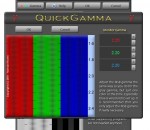
QuickGamma is a small utility program to calibrate a monitor on the fly without having to buy expensive hardware tools. The relationship between the input signal and the luminance of a monitor is not linear but exponential with gamma being the exponent. A gamma value of 2.2 has become the de facto standard in Windows, the Internet and the digital photography. This means that only monitors with a gamma value of 2.2 will produce a correct output. Despite the fact that the gamma values of monitors have improved over the years, many monitors still have a gamma value that deviates more or less from 2.2. A correction is therefore required to achieve optimal results. The monitor gamma can easily be corrected to 2.2 using QuickGamma. More information and detailed instructions on how to use QuickGamma are available by pushing the Help button in QuickGamma.
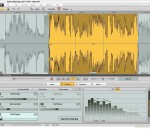
MAGIX Audio Cleaning Lab MX - Professional audio editing and restoration made easy With MAGIX Audio Cleaning Lab MX you can quickly and easily digitize your favorite songs, voice recordings and more. Adjust audio material as you see fit, burn to CD or simply save everything to your hard drive, MP3 player or smartphone - achieve the perfect result in just a few steps! The audio editing software offers a wide range of easy-to-use, effective tools and functions for editing, optimizing and converting of all kinds of audio material as well as voice recordings. User friendliness and sound quality are always the top priority! Transfer your favorite music to your hard drive, smartphone or to CD & DVD Edit any audio material to your taste and enjoy old songs , LPs & cassettes on the go with your MP3 player, smartphone or CD using your stereo, car radio, etc. With just a few clicks you can record individual songs, whole albums or samplers, and easily digitize and restore your favorite music from old data carriers using professional tools! Audio editing support right from the beginning The smart program dialog supports you in all your tasks. Whether you want to digitize records, tapes or speech, remove noise from a recording or optimize the sound of an MP3 file. The audio program automatically adjusts all settings depending on what you want to do, so you can start recording or optimizing your sound immediately and won't lose time clicking through dialogs and adjusting program settings! Over 60 new sound optimization presets Use more than 60 brand new handy presets for fast, effective sound optimization for various situations. Effortlessly remove bothersome background noise such as traffic, street noise, weather or electronic interference. The applications are varied - don't compromise, solve the problem! - Effectively get rid of rain and wind noise - Remove computer fan noise, mobile phone and camera interference
TMPGEnc Video Mastering Works 5 is a multi-format digital video converter, allowing you to convert various video formats into other formats. Import, edit, enhance, and encode your videos with the easy-to-use interface preferred by users the world over. Add video clips in practically any format, cut-out unwanted scenes, correct and enhance your video and audio, then encode to the format of your choice using custom settings or templates for popular formats. Be sure to check out the new features as well. The Start-up Lancher window gives you the first option for your project. If you just need to convert one video, or link together several videos, choose the "Normal Mode". If you want to create a more sophisticated output with layered videos, or mix video with different audio sources, choose the "Timeline mode". Next, use the Format selector to choose the output format and continue to the Encode process. Voil
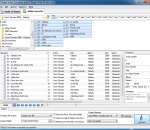
Magic Audio Converter and CD Ripper is your all-in-one solution for audio conversion, tag editing and CD-ripping. It supports over 20 different formats and you can convert multiple files in batch mode. The software is also easy to use, offering you an intuitive interface with all the features that you need. You can also play audio within the program, edit tags and more. Converting your music is just a matter of a few clicks and then you're done.
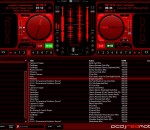
Built off of the PCDJ DEX Technology, RED Mobile is lighter DJ software aimed directly at the needs of the Mobile DJ. Everything you want to make your job easier, with a clean and user friendly interface that easy to navigate. Use many of the top controllers or a simple keyboard and mouse, your choice! PCDJ Red Mobile is a computer mixing program geared for a Mobile DJ’s needs. Red Mobile has a powerful Recordcase (track library) that allows you to Import, Mix, and Search all of your mp3, ogg, wma, flac, wav files, unprotected iTunes files easily. Red Mobile supports multiple m3U waitlists, play-list, or crates of mix and match tracks. PCDJ RED Mobile is all you need to rock any mobile event! With Autoplay, a MIX NOW button for quick crossfade and play, an easy to navigate user interface, you have the mobile DJ’s dream package. Less screen clutter and just the right feature set to make your job as easy as possible. Concentrate on your clients and not your DJ software! Features * NEW- Supports iTunes Tags * Track rating column * Support for new KARAOKI plug-in * Support for Monkey’s audio file format * Improved Audio Engine * Option for daylight skin * Option for ‘accurate mp3 time’ * Right-click on column headers to change them * Play mp3, wma, ogg, flac, wav, or directly from a CD * Autoplay – automatically play through waitlist or group mixing from track to track * Mix Now button for quick and seamless crossfade and play * Change pitch with 4 different ranges from +/-8% to +/-100% * Change volume, play and pause (instant-start) with low latency (down to 2ms with ASIO, up to 10ms with DirectSound) * Edit ID3v2 tags for mp3’s and the ogg vorbis tag for ogg files * Fast and accurate automatic BPM detection * Pre-Listening -Through Soundcard rear-out - Through Left/Right splitter or Through Second Soundcard * Output to external mixer - Player 1 to Front Out, Player 2 to Rear Out or Player 1 to Soundcard 1, Player 2 to Soundcard 2 * DirectSound or ASIO output * Spectrum analyzer, stereo VU Meter * Configurable song break and startup speed for turntable-like effects
GOM Media Player The only media player you need - for FREE! Not only is GOM Media Player a completely FREE video player, with its built-in support for all the most popular video and Media Player formats, tons of advanced features, extreme customizability, and the Codec Finder service, GOM Media Player is sure to fulfill all of your playback needs. With millions of users in hundreds of countries, GOM Media Player is one of the world`s most popular video players. Whats New : Added "Touch Setting" feature for touch screen devices. Added "Search box" feature on playlist. (Ctrl+F) Supported "HTTPS URL" for youtube or net radio playback. (Ctrl+U) Added "Music Tap" on preferences related to play music files. Improved performance related to "speed of add & delete" of files on playlist. Other miscellaneous corrections, fixes, and changes
RealPlayer has always enabled you to play RealAudio (*.ra) and RealMedia (*.ram) files. Download videos from thousands of Web sites with just one click Build your own video library and playlists Play all major audio and video formats Flash Video support DVD, SVCD, VCD burning and video recording RealPlayer for personal use includes audio CD burning capabilities, DVR-style playback buffering, multimedia search, Internet radio, a jukebox-style file library, an embedded web browser (using Microsoft Internet Explorer), and the ability to transfer media to a number of portable devices, including Apple's iPod, MP3 players, and Windows Media devices.
GOM is a FREE media player with popular audio & video codecs built-in. Codec Finder GOM Player includes many codecs (XviD, DivX, FLV1, AC3, OGG, MP4, H263 and more) so you won't need to install separate codecs for most videos. For those videos that require a separate codec, GOM Player will find one. Play Broken AVI Files (Patented) GOM Player's patented technology enables users to view files with broken indexes or that are still being downloaded. Powerful Subtitle Support GOM Player supports SMI, SRT, RT, SUB(with IDX) files for subtitle. You can even synchronize subtitle and video if there's any mismatch. Convenient Playlist If you run a video file and there is already a file with a similar name in the directory, it will be automatically added to your playlist. GOM Player has a similar playlist format as M3U, PLS, ASX. Support Different Media Types Along with different media format such as AVI, MPG, MPEG and DAT, GOM Player also supports streaming Windows media format (WMV, ASF, ASX). You can also watch DVD-quality videos with 5.1 channel audio output.