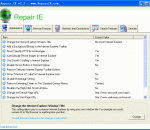
Repair IE is a free but powerful repair utility for Internet Explorer, with Repair IE you can safely clean, repair and optimize the Internet Explorer registry with a few simple mouse clicks! By using this repair tool regularly and fixing registry errors your IE browser should not only be more stable but it will also help improve your IE browser performance. There are times when Internet Explorer will start crashing or producing errors for no apparent reason, especially if your windows system has been infected with spyware, malware and viruses that have damaged your computer, you may find it necessary to fix Internet Explorer from time to time, once the viruses has been removed, you can proceed with a repair of IE. On www.repairie.com homepage, You can find full details of IE 60 repairs. This program is suitable for Windows 98/ME/XP/Vista systems.
Nokia Drop is an extension for Chrome designed to enable you to send online content to your mobile device. With it you can: · Change your phone's wallpaper · Send image as a file to your phone · Send URL to your phone Nokia Drop uses Push Notifications, so no cable or Bluetooth connection is needed.
BitDefender QuickScan is an online tool which uses .in-the-cloud. scanning to detect malware running on a PC very fast, usually in less than 60 seconds. Because it's fast! Whenever you need a quick check or a second opinion, such as before logging in to your favourite game, when using your bank account online or buying something online, QuickScan is the best choice. To launch a QuickScan you just need to visit homepage and click 'Start Scan'. For even faster access, BitDefender QuickScan is also available as an iGoogle widget and as Firefox and Chrome extensions. In a single word: speed. Most online scanners are merely legacy on-demand scanners that are downloaded (along with a huge virus database) and then used to scan your PC as you would do with a normal Antivirus program. This can usually take from 30 minutes to one hour. BitDefender QuickScan takes full advantage of the .in-the-cloud. scanning technology and is capable to detect active malware in less than a minute, taking just a fraction of the system resources needed by a regular virus scan. Moreover, there is no need for annoying virus signature updates, as the entire virus database and the scanning engines are hosted on remote servers.
BzReader is designed to enable users to browse Wikipedia without going online. The uncompressed Wikipedia dumps can take hundreds of gigs of disk space. BzReader can search and show the articles from the compressed dump files. The main window of BzReader allows users to open a dump file and navigate its content with ease. The typical usage would be: Download one or several .xml.bz2 dumps of Wikipedia topics from homepage You will need the files named pages-articles.xml.bz2 for your language. Alternatively, you may use any database dumps which follow Wikipedia XML format - Wikibooks, Wikitravel etc. Install BzReader Open the Wikipedia dump in BzReader (you can have multiple dumps opened at the same time, all of them will be searched together) Let BzReader create the index for fast retrieval of topics. This might be quite lengthy for big dumps. It takes about 4 hours on Core 2 Duo to index the current dump of all English topics (enwiki-20080312-pages-articles.xml.bz2, 3.5 Gb file). The BzReader index for this dump takes about 550 Mb. Browse! Enter your search terms into the search window on the left, wait for the result(s) and click on the topic. Try also something like "music*" to find anything that starts with "music".
This theme will bring some scary zombies to your Firefox web browser! Includes a scary theme and some quick links to all your favorite sites Easy to install and we include an un-installer too! SEARCH: Our primary revenue source is BING. We will reset your default search engine when installed so please give BING a try! PRIVACY: We respect your privacy. We do track some data - but it's only numbers. We follow the total number of active themes, clicks on the extension buttons and themes using our search partners. That's it. Nothing is personally identifiable and nothing is on an individual basis. The full legal description is at brandthunder.com/eula if you'd like extra assurance. COMPATIBILITY: This theme has been tested with the Top 50 most popular and recent extensions. Please email us at email if you find any conflicts. ABOUT US: Brand Thunder works with leading brands to develop custom Firefox add-ons. We have worked with the leading social networks, sports teams, news publishers, entertainment and gossip sites, colleges, blogs, radio stations, music as well as our own themes for football, baseball, soccer and the holidays - lots of exciting partners are on the way, so stay tuned!
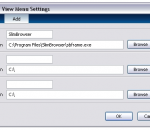
Use Browser View for just IE (using IE single-line menus and standalone toolbar button) or for multiple browsers (using multiple-browsers drop-down menus and drop-down toolbar button). Browser View file size is only 21.5 KB. Right-click Firefox bookmarks to open directly in IE, Chrome, or any other browser-- without the need to first open, and then close, the bookmarked web page in Firefox. Browser locations, and related menu text, are determined automatically, from a search of the Windows Registry. Users may also manually modify these browser locations, or enter additional or portable browsers.
EMACHINES Webcam Capture Utility is an excellent free webcam capture and webcam recording utility that can capture video stream from webcams or video capture devices plugged in your computer and save video streams and images to files directly to your local disk. No need to purchase as it is free for download and never expires, but the registered version has more features.
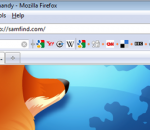
The samfind Bookmark Bar picks up where Firefox's Bookmarks Toolbar leaves off: - Choose your favorite websites to add to your Bar to get to them quickly, - Easily fit hundreds of websites on the Bar by organizing them into topics, - Integrate your current FF Bookmarks Toolbar websites into your Bar with one click, - Search within websites using their own search engine right from the Bar, - Access website’s RSS feeds at the touch of a button, - Choose which social and bookmarking services to interact with from the Bar: Digg a story, submit to Reddit, save to Delicious, tweet to Twitter, post to Facebook, and Stumble! the web. - Place the Bar where you want: standard toolbar, below the web page, or inline next to the URL, - Show favicons only, text only or both favicons and text, - Access your Bookmarks with our hot-key system, - Synchronize your bookmarks to access them from more than one computer Social and Bookmarking services include: StumbleUpon, Digg, Reddit, Twitter, Facebook, Delicious, LinkedIn, TinyURL, MySpace, Bloglines, Blogmarks, FriendFeed, Furl, Google Bookmarks, Live, Magnolia, Mixx, Propeller, Slashdot, Technorati, Yahoo! Bookmarks, Yahoo! Buzz, Sphinn, BallHype, bit.ly, BlinkList, Connotea, Current, Diigo, DZone, Fark, Faves, FoxieWire, Google Reader, Health Ranker, Kaboodle, Kirtsy, MyAOL, Netvouz, Newsvine, Plurk, Simpy, Sphere, Spurl, Streakr, Stylehive, Tailrank, Tipjoy, Truemors, Tumblr, Twine, Xanga, Yahoo! MyWeb and Y Combinator. Add ANY WEBSITES YOU WANT or quickly add pre-formatted topics and websites, like: – SEARCH: Google Search, Yahoo, MSN, Wikipedia, Mahalo, and more... – NEWS: Google News, Digg, Reddit, New York Times, WSJ, BBC, CNN, Delicious, and more ... – REFERENCE: Dictionary.com, Encyclopedia.com, Ninja Words, Rhyming Dictionary, and more ... – BANKS: Wells Fargo, Bank of America, Citibank, Paypal, WaMu, and more ... – MAPS: Google Maps, Yahoo Maps and Google Transit –EMAIL: Gmail, Hotmail and Yahoo Mail
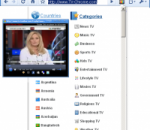
Chrome TV lets you stream international TV stations to your desktop via a browser pop-up inside Google Chrome. It draws its listings from an online database, which means you can't add your own channels or make other changes. Chrome TV's selections are nothing if not diverse--linguistically and geographically, at least. The programming leans toward news, weather, and sports broadcasts as well as what might be called cultural affairs programming, though we did find some movies, classic cartoons, and other pleasant surprises. Chrome TV is free and installs easily, but it might require the Windows Media Player browser plug-in, which is also free. This plug-in was intended for Firefox, and it's listed for Vista, but it works in the latest version of Chrome, too, and we had no problem running it in Windows 7 64-bit. Chrome TV's extensions page had some useful support information but no configuration options to speak of.
The Amazing IE Extension is an add-in for the standard Internet explorer.It's simple to install.Just download it.As well as displaying a completely new look and feel,the main Amazing IE Extension bar doesn't get in your way like the standard internet explorer bar does.Simply drag it where you want it! Discover a re-designed much more efficient favorites system.This is much easier to use than the standard Internet Explorer favorites,and also features a built-in text editor for each favorites folder! Use features such as Notification to set reminders to visit a page,open an application and even set an alarm clock! Use the built-in Calendar and keep track of your schedule in an internet fashion. Use the quick link viewer for easier access to your favorite url's. When necessary,toggle back to the standard Internet explorer bar.The Amazing IE extension has a lot to offer.Give it a shot!
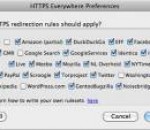
HTTPS Everywhere is a Firefox extension produced as a collaboration between The Tor Project and the Electronic Frontier Foundation. It encrypts your communications with a number of major websites. Many sites on the web offer some limited support for encryption over HTTPS, but make it difficult to use. For instance, they may default to unencrypted HTTP, or fill encrypted pages with links that go back to the unencrypted site.
Mozilla Firefox is a graphical web browser developed by the Mozilla Corporation, and a large community of external contributors. Mozilla Fire Fox protects you from viruses, spyware and pop-ups. Enjoy the improvements Mozilla Firfox offers to web browsing performance, usability, privacy and security. Mozilla Firefox is 100% free and is rated the best web browser by many reliable sources. Block annoying pop-ups Firefox blocks pop-ups automatically. Google Search Toolbar Search Google with ease using a unique enhanced suggestion search. Tabbed Browsing Speed up web browsing by viewing more than one web page in a window. Solid Security.
Adobe Shockwave Player Over 450 million Internet-enabled desktops have Adobe Shockwave Player installed. These users have access to some of the best content the Web has to offer - including dazzling 3D games and entertainment, interactive product demonstrations, and online learning applications. Shockwave Player displays Web content that has been created using Adobe Director.
Explore the Chrome Browser Chrome is a fast, simple, and secure web browser, built for the modern web. Speed Chrome is designed to be fast in every possible way. It's quick to start up from your desktop, loads web pages in a snap, and runs complex web applications lightning fast. Simplicity Chrome's browser window is streamlined, clean and simple. For example, you can search and navigate from the same box and arrange tabs however you wish -- quickly and easily. Security Chrome is designed to keep you safer and more secure on the web with built-in malware and phishing protection, auto-updates to make sure you have all the latest security fixes, and more. Privacy Chrome puts you in control of your private information while helping protect the information you share when you’re online. Customization There are tons of ways to customize Chrome and make it yours. It's easy to tweak your settings and add apps, extensions, and themes from the Chrome Web Store. Signing In Signing in to Chrome brings your bookmarks, history, and other settings to all your computers. It also automatically signs you in to all your favorite Google services. More