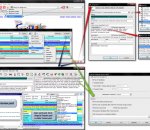
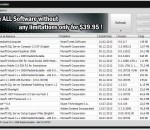
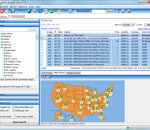
Integrating with the latest versions of Google Chrome, Firefox, Internet Explorer, and Opera browsers, Linkman gives you the power to efficiently organize bookmarks and favorites! Linkman is a standalone, browser independent bookmark organizer and search tool. Add links from browsers, and Linkman will retrieve keywords and descriptions automatically! Not only can Linkman organize your bookmarks, it can also help you detect and eliminate duplicate links from your bookmark collection. You get the choice to organize your bookmarks by keywords only, folders only, or folders and keywords. Linkman stores bookmarks in XML databases, and is well known for providing 15 years of bookmark data security. It's constantly improved and receives several updates every year. Linkman is a bookmark organizer which provides uniform access to bookmarks and favorites across browsers. If you add a bookmark in Internet Explorer, you can access the new bookmark also in Firefox, Google Chrome, Opera and vice versa. You get also the ability to import your existing bookmarks into Linkman from all browsers. Linkman is the only bookmarks organizer that is able to maintain the correct IE Favorites order and import Firefox bookmarks including both tags and keywords! Linkman supports up to 10 different import formats and you can even parse any file for bookmarks. In the search window Linkman uses wildcards and operators to combine search terms. AND (DEFAULT), OR, AND NOT and the '-' sign can be used. Example: a search for backup software -usb will find all links containing the keyword backup AND the keyword software, but NOT containing the keyword usb.
QrCodeR is a Firefox extension designed to convert text selections, links and images to QrCode by right-clicking the elements. USAGE: Right-click the link or image of interest, select one of the options and QrCodeR will display the generated barcode.
Bring some anime to your browser with this theme for Firefox. Includes a cool theme and built in links to your favorite sites..
Soft4Boost Any Uninstaller helps you to uninstall software and remove unwanted or corrupted programs installed on your computer easily! Even if you have problems uninstalling and cannot uninstall them from "Windows Add or Remove Programs" control panel applet.
Do you own a site that needs more visitors and sales? Are you struggling to get ranked higher in Google, Yahoo and Bing, but your competition is always one step ahead? Have you tried to optimize your site? Did you know exactly what should be done? Or did you simply give up and investing now hundreds to thousands dollars a week in Pay Per Click ads? Well, consider your problems solved now!. Get a top #1 ranking on Google, Yahoo and Bing with the cheapest but highly effective small business SEO. Visit homepage to learn more.
Linkman Pro is a link checker tool that can check bookmarks for dead links, intelligent (only major) content changes, and page movements. After the link checking procedure, the names of the links with changed content since your last validation will be underlined. Dead links (status 404) will get a red icons, and sites that have moved (status 301 and 302) to a new domain will get yellow icons. The link checker has the ability to automatically update URLs of links that have moved to the address of the new location. Linkman's link checker has the ability ro retrieve missing link names, descriptions, keywords and customizable meta tags. Linkman Pro is a link manager that integrates with the Firefox, Internet Explorer, Google Chrome, and Opera browsers. It replaces the browser's native bookmarks with far more powerful link management facilities. Linkman offers you an easy way to protect your privacy. You get the ability to password protect bookmarks. Since Linkman can load two different databases at the same time, you even get the option to make one database public and to password protect the second database. Select password protection from the file menu to set a password and then save your database. The next time you load Linkman (with this database as default), you will be asked for a password. With Linkman you can export bookmarks in a variety of formats. You can even build your own Export Templates. Several Template examples, such as XML and HTML output, are included. With some basic scripting knowledge you can export bookmarks in virtually any format you need. Template output can be generated automatically every time the Linkman XML database is saved.
The ultimate tool for searching classified ads is now at your fingertips! Classifieds Searcher is the ultimate product that gives you fast, powerful and yet flexible interface to both Craigslist, EBayCLassifieds, Oodle, Backpage, Cars.com and Autotrader.com results from any computer with internet connection. Simply install Classifieds Searcher on your computer (it takes less than a minute), log into your account (If you have the POWER version. The FREE version doesn't require login) and start exploring a whole new world of classified ads. Based on your criteria, our software will robustly deliver results from the supported sites. Using Classifieds Searcher you can: Search both Craigslist and/or Backpage (more sites will be supported soon) Search all cities and categories at once with options for each selected category Specify a ZIP code and/or radus (in miles) to search in (if your city is not listed - we will use the neighbouring ones) Automatic searching Get notifications for new results (by email and/or SMS) or even forward them to your email Map overlay of results (very useful if you do a global search with many results) Results sorting by date / price / location / category Support for multiple searches that can also be saved locally Storing favorite posts and custom notes associated with them Exporting results to Excel Predefined keyword patterns and helper buttons and much more... Once your searches are created you can let it run in the background and gather results for you. Configure email or SMS forwarding and you won't even have to be in front of the computer. Our software product doesn't just save your time - it helps you find deals that you would otherwise miss. Can you afford doing that? The evolution has begun, don't miss it! Want notifications, forwarding of results, no ads, automatic updates, unlimited usage, and more? You need the POWER version!
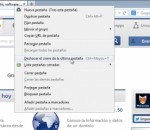
Tab Mix Plus enhances Firefox's tab browsing capabilities. It includes such features as duplicating tabs, controlling tab focus, tab clicking options, undo closed tabs and windows, plus much more. Tab Mix Plus also includes a full-featured session manager with crash recovery that can save and restore combinations of opened windows and tabs.
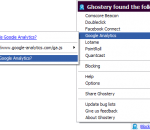
Ghostery is your window into the invisible web – tags, web bugs, pixels and beacons that are included on web pages in order to get an idea of your online behavior. Ghostery tracks the trackers and gives you a roll-call of the ad networks, behavioral data providers, web publishers, and other companies interested in your activity.
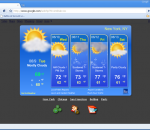
AniWeather animates weather in vivid animations for worldwide locations worldwide. It switches different locations in one click. Aniweather provides flexible weather reports, from real time current condition, radar/satellite map, to 5-day forecast, and to more detailed hourly report. It is quite customizable to fit your preference (temperature unit, location list, animation details, etc.). Available for Mozilla Firefox and Google Chrome. More information at homepage
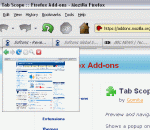
Tab Scope will enable you to preview and navigate tab contents through popup for tabs. Tab Scope is a very easy-to-use Firefox extension that will enhance your Internet surfing experience. Tab Scope is a Firefox extension which enables to preview and navigate tab contents through popup. - Real-time preview of tab contents - Navigate (Back/Forward/Reload/Stop) through popup - Scroll pages in preview with scrolling mouse wheel - Click links or buttons directly in preview - Automatically show preview for tabs opened in background
Mozilla Firefox is a graphical web browser developed by the Mozilla Corporation, and a large community of external contributors. Mozilla Fire Fox protects you from viruses, spyware and pop-ups. Enjoy the improvements Mozilla Firfox offers to web browsing performance, usability, privacy and security. Mozilla Firefox is 100% free and is rated the best web browser by many reliable sources. Block annoying pop-ups Firefox blocks pop-ups automatically. Google Search Toolbar Search Google with ease using a unique enhanced suggestion search. Tabbed Browsing Speed up web browsing by viewing more than one web page in a window. Solid Security.
Adobe Shockwave Player Over 450 million Internet-enabled desktops have Adobe Shockwave Player installed. These users have access to some of the best content the Web has to offer - including dazzling 3D games and entertainment, interactive product demonstrations, and online learning applications. Shockwave Player displays Web content that has been created using Adobe Director.
Explore the Chrome Browser Chrome is a fast, simple, and secure web browser, built for the modern web. Speed Chrome is designed to be fast in every possible way. It's quick to start up from your desktop, loads web pages in a snap, and runs complex web applications lightning fast. Simplicity Chrome's browser window is streamlined, clean and simple. For example, you can search and navigate from the same box and arrange tabs however you wish -- quickly and easily. Security Chrome is designed to keep you safer and more secure on the web with built-in malware and phishing protection, auto-updates to make sure you have all the latest security fixes, and more. Privacy Chrome puts you in control of your private information while helping protect the information you share when you’re online. Customization There are tons of ways to customize Chrome and make it yours. It's easy to tweak your settings and add apps, extensions, and themes from the Chrome Web Store. Signing In Signing in to Chrome brings your bookmarks, history, and other settings to all your computers. It also automatically signs you in to all your favorite Google services. More