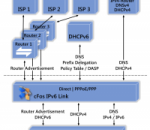
Connectivity with the new IPv6 network cFos IPv6 Link for Windoes x64 allows dial-up with IPv6 for Windows x64. Install cFos IPv6 Link, configure the dial-up connection to your ISP and you're done! cFos IPv6 Link does not only connect to the new IPv6, but also configures the routing and IP and DNS addresses automatically. Under XP cFos IPv6 Link also maps IPv4-based DNS queries of IPv6 adresses. cFos IPv6 Link is fast. Like cFos Broadband Connect it achieves a much higher throughput than the PPPoE driver shipped with XP/Vista/7 (with a fast enough Internet connection). At load time cfos IPv6 Link performs an auto-detection of the connected network devices and switches into one of the following modes: * Router mode: If cfos IPv6 Link detects a router or DHCPv6 server it uses this device to route data to the Internet. * Dial-up mode: If cfos IPv6 Link detects a PPPoE node connected to the network card (e.g. via DSL) it establishes a PPP/PPPoE connection to the Internet provider either automatically or on demand. * Mixed mode: If cfos IPv6 Link detects an IPv4 DHCP Server attached to the network card (regardless of other IPv6 devices), it passes all IPv4 traffic through to this IPv4 Router. This allows simultaneous use of IPv4 and IPv6. Windows prefers IPv6 by first trying to resolve an address to an IPv6 address and only uses IPv4 if no IPv6 address is (yet) available. IPv4 is thereby a fallback for IPv6. Mixed mode is possible with routers that support "PPPoE Passthrough", e.g. Speedport. Then the IPv4 traffic travels as usual to the IPv4 provider, while IPv6 traffic travels via PPPoE to the IPv6 provider. The cFos IPv6 Link application was designed to provide IPv6 Connectivity for Windows x64. Features at a glance: * IPv6 dial-up driver for Windows * Automatic routing and address configuration * IPv4 <-> IPv6 DNS mapping * DHCPv6 Stateful, Stateless, Prefix Delegation * High-speed, 10x faster than the Windows Vista driver * Configurable DHCP DUID * VLAN support
You need to build a 4D-based web site. You want the best, most flexible, most productive and most cost-effective tool available. And you don’t want to learn a whole new tag language. Active4D is the ultimate 4D web development environment, offering you unparalleled power and simplicity while leveraging your existing 4D programming knowledge. Nothing else comes close. With Active4D, you aren’t stuck with the limitations (and unreadable syntax) of simple tags, you write the same 4D code you are used to. Use local variables, access fields, call methods, you name it — if you can do it in 4D, you can do it in Active4D, right in your web page. But Active4D doesn’t stop there. It extends the 4D language itself with much sought after enhancements, like vastly improved string handling, a collection data type (kind of like ObjectTools on steroids), and extensive, integrated regular expression support. If you are building a dynamic web site, you need session support. Sessions allow you to store per-user data between requests. Things like user ids, shopping carts, and so on. With Active4D, session support is built in and integrated directly into the language. You can store any number of named items of any type in a session, including arrays. It doesn’t get any easier. Because your Active4D code lives in text files, you can update your site without touching your database structure. Just upload the modified files to your site and you’re done. No recompiling. No server restart. No downtime. Best of all, you are free to use a dedicated programmer’s editor and you can easily keep all of your code under a version control system like git.
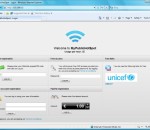
Complete Software Solution for HotSpot Billing. All you need is a Windows PC with TWO network cards, a WiFi Access Point and this Software. Allow your customers to use your wireless LAN at a charge or free. Unlimited Concurrent Users per Installation Location. Keep 100% of your profit: No ongoing leasing or additional costs. Keep your own branding: Customizable HTML-Pages and Dialogs.Authentification Methods: Prepaid PIN Code, Username&Password;, PayPAL, CreditCard, simple Password (for free access); Zero-Risk Free Trial Version! Lets you configure "Free pages" (e.g. your homepage).
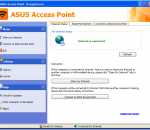
ASUS Access Point is an easy-to-use software that turns your ASUS laptop into a Wi-Fi wireless access point. Anyone nearby can surf the Internet through your sharing. This is also an ideal solution for setting up a temporary AP in a hotel room, meeting room, at home or the like. Different from Virtual Access Point software which is hardware-independent, ASUS Access Point is designed for ASUS hardware only. Other laptops are not supported officially. So please choose the correct software from Laptop Access Point Series for your laptop.
WirelessMon is a software tool that allows users to monitor the status of wireless WiFi adapter(s) and gather information about nearby wireless access points and hot spots in real time. WirelessMon can log the information it collects into a file, while also providing comprehensive graphing of signal level and real time IP and 802.11 WiFi statistics. * Verify 802.11 network configuration is correct. * Test WiFi hardware and device drivers are functioning correctly. * Check signal levels from your local WiFi network and nearby networks. * Help locate sources of interference to your network. * WirelessMon supports the MetaGeek Wi-Spy (2.4i, 2.4x and DBx) useful for finding interference from non 802.11A/B/G devices transmitting on the same frequencies * Scan for hot spots in your local area (wardriving) * Create signal strength maps of an area * GPS support for logging and mapping signal strength * Correctly locate your wireless antenna (especially important for directional antennas). * Verify the security settings for local access points. * Measure network speed & throughput and view available data rates. * Help check Wifi network coverage and range Any wireless adapter complies with the NDIS_802.11 should be able to report information to WirelessMon. Note that only Windows XP, 2003 and Vista support this software. Windows 95, 98 and NT are not supported. Windows 2000 (Service pack 4 and above) may work but is not actively supported. All the various IEEE 802.11 standards are supported, including 802.11a, 802.11b and 802.11g. 802.11N is supported to the extent provided by Windows XP and Vista, as the draft becomes a completed standard more 802.11N support should become available. Some features may not be supported by some wireless adapters, typically they will report only partial information in this case. It has been also been noted that several wireless adapter manufacturers are not providing device drivers that are fully Windows compliant. The following wireless LAN information is displayed by WirelessMon (when available, as not all wireless adapters will support all of these features). * Current connection information: SSID; Connected access point MAC address; Signal strength; Tx Power; Authentication type; RTS Threshold; Fragmentation Threshold; Channel in use; Frequency being used; Number of Antennas; Beacon Period; ATIM Window; Dwell Time; Hop Pattern; Hop Set. * Statistics information: More than 30 parameters are reported. Including a detailed break down of frames sent and received, error counts, transmission retry counters and related low level data. * IP information: Information about the current TCP/IP connection is reported. Including the adapter MAC address; Adapter device driver name; the IP Address; Subnet Mask; if DHCP is enabled; the Gateway Address and the DHCP server IP address. * IP counter information: Network throughput is monitored and displayed. This includes the maximum bandwidth available from the network adapter hardware, the current send and receive data rates in bytes per second and packets per second, plus error counters.
Active Directory change auditing is an important procedure for limiting unauthorized changes and errors to AD configuration. One single change can put your organization at risk, introducing security breaches and compliance issues. Built-in Active Directory auditing lacks many important features and doesn't have reporting capabilities. Careful analysis of multi-megabyte Security logs can take enormous resources and still never paint the whole picture. Netwrix Active Directory Change Reporter is a free tool that reports the changes made to Active Directory and delivers a summary and detailed information on a daily basis. The report includes the 4 "W"s - Who, What, When, and Where - of all changes and includes "before" and "after" values for each setting. This report lists changes made to AD and Exchange configurations, mailboxes, AD schema, and many more. Generated data can be used to: * Monitor day-to-day administrative activities. * Prepare compliance reports for your SOX, GLBA and HIPAA auditors. Netwrix Active Directory Change Reporter records all modifications, including both user and administrative activity, and e-mails daily reports to AD administrators detailing every Active Directory change. Collected audit data is archived and can be stored for years, so you can build a summary of changes made to Active Directory during any period and drill down to detailed information as necessary. This archiving function allows organizations to analyze any policy violations, adhere to security best practices and maintain established internal policies. The tool is provided free of charge for use by organizations and individuals.
This tool is an advanced local browser history search engine. Within a few seconds it will extract the chosen keywords of most web browsers (Google Chrome, Comodo Dragon, Internet Explorer, Opera Browser, RockMelt). The program will attempt to find the keyword(s) in the history title and search. If the keyword is present or suspected to be, it will be display in the resultslist with his URL and Title. The software also gives you the opportunity to edit the default keywords and of course add and/or modify your own keywords. Also available in console mode as Orion Browser Dumper.
iNTERNET Turbo® is an AWARD-WINNING Internet solution, which easily solves two of the most well known Internet problems: slow connection performances, undesirable disconnections. iNTERNET Turbo® can prevent TCP/IP protocols data transfer from fragmentation. By using it you can boost your Internet connection performances up to 200% (we also got users’ reports on 300% improvement). iNTERNET Turbo® also includes Forever Connected feature which prevents you from being disconnected by your ISP (Internet Service Provider). Most Internet Service Providers have inactivity timeout, they will disconnect you after a fixed time of modem inactivity. How many times did you leave your computer for a few minutes and the moment you came back you found out that somehow you had been disconnected? How many times did you decide to read something on the net and before finishing it the disconnect dialog appeared? iNTERNET Turbo® will prevent those undesirable disconnections by sending and receiving a data package every fixed time. Highlights: Supports all software and hardware adapters. Easily restores the default Windows settings. Automatic wizards to configure Dialup, LAN, ISDN, Cable, xDSL and more. Manual wizards to configure Dialup, LAN, ISDN, Cable, xDSL and more. Includes easy registry backup. Fix MaxMTU, RWIN, TTL, Session Keep Alive, PMTU and NDI Cache. Prevent you from being disconnected by your ISP (Internet Service Provider) Includes a comprehensive help file. iNTERNET Turbo® saves a lot of time, money and frustrations. It’s a MUST HAVE tool for everyone who uses an Internet connection. It boosts any Internet related software such as browser/email programs, CompuServe, RealAudio, RealVideo, ICQ and many others… Moreover it also prevents an undesirable disconnection. iNTERNET Turbo® is being used by people all over the world and the reviews are amazing. It Includes a very intuitive and simple to operate user interface and a comprehensive help file.
Network servers have a lot of configuration settings that require constant updates and maintenance. Every configuration change can potentially impact your users and cause major disruptions in services and applications. Common example: changes done yesterday made your systems unstable, and you don't remember the old settings. Netwrix Windows Server Change Reporter is a free tool for automated auditing and documentation of all changes made to server configurations: hardware devices, drivers, software, services, networking settings,etc. The tool monitors all managed servers centrally and records all changes, e-mailing full audit report, grouped by server name, at the end of every day. Newly added hardware, upgraded drivers, services - everything is audited and reported. Two editions of Netwrix Windows Server Change Reporter are available: freeware and commercial. Please contact Netwrix Corporation at www.netwrix.com for more information.
You can easily share an external USB drive or a printer over a network. But why can't you share all the rest of your USB devices just as easily? Lab instruments, scanners, cameras, card readers, bar code scanners, PDAs, USB keys and others are usually considered to be non-shareable. Thus, normally you need to move your USB devices from one computer to another. Sometimes, though, this is not an easy task, especially when you need to use a device that is physically located in another building or even another city. USB is the standard interface used by most modern computer devices today. But, USB was designed to connect electronic peripherals only to a single computer. Previously, the only way to share a non-shareable device was to buy an expensive hardware USB switch. A hardware switch takes up space, consumes power and is often quite expensive. USB Over Network is a revolutionary software solution from FabulaTech. No need to move devices from one computer to another, and no need to buy expensive hardware switches. You can access a USB device connected to a remote computer from your computer via a LAN or the Internet as if it were physically plugged into your own PC. The program consists of a "Server" and a "Client". You should install the Server on the computer to which the device you want to share is physically connected. You can install the Client on all PCs from which you need to access the shared device. USB Over Network is easy to install and use. It supports a wide range of USB devices. The program does not require any special knowledge and installs easily right out of the box. Share your USB device without risk of losing it! Access remote instruments without leaving your chair!
Badosoft's Connectivity Fixer is a must for every Internet user! Connectivity Fixer is monitoring your Internet connection, whenever you are connected to the Internet. In the case, that the "connection monitor" will find a problem with your Internet connection, Connectivity Fixer will automatically try to resolve the problem, so that you can continue surfing the Internet. In times where Viruses, Worms, Trojans, Malware, Spyware and Adware aggressively spreading out, connectivity problems are nearly a daily issue. Badosoft's Connectivity Fixer will help you to solve some of the most common connectivity problems you might experience with your Internet connection. Badosoft's Connectivity Fixer is a perfect beside tool if you are using Antivirus-, Trojan-, Spyware-, Adware- and Malware scanner to solve IP and Winsock related issues!
Maryfi is a free and easy to use software router for Windows 7, 8 , and 8.1 computers. With Maryfi, users can wirelessly share any Internet connection such as: a cable modem, a cellular card, or even another Wi-Fi network. Other Wi-Fi enabled devices including laptops, smart phones, music players, and gaming systems can see and join your Maryfi hotspot just like any other Wi-Fi access point and are kept safe and secure by password-protected WPA2 Encryption.
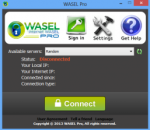
What's WASEL Pro? WASEL, is a VPN service provider with one of the most easy to use software client and reliable stable services, WASEL is your secure and safe gateway to the internet, By using our software and service you will be able to surf the internet anonymously and safely through high speed network of servers.. By using WASEL Pro VPN service, you can browse the Internet freely without any limitation, Make VOIP calls through Skype, and speed up your Internet connection by using advanced compression technique.. Using WASEL Pro service gives you the advantage of browsing the Internet anonymously and totally secured.. The tunnel established between your device and WASEL VPN servers is double encrypted and using top security measurment for secure and safe enviroment, Hackers will not have a chance getting to reach your device due to no show of your original IP address and the highly encrypted data transfer.. Why WASEL Pro? Easy installation and one click to connect application, just a setup our OpenVPN client on your device, insert your username and password and click connect.. Trusted & reliable VPN Solution for private and business use.. Several features (L2TP/OpenVPN), unlimited bandwidth, No restrictions over use, support…