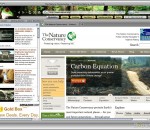
Be green with this eco-friendly nature theme for your Firefox browser! Includes links to leading sites, environmentally friendly products and an easy way to contribute to rain forest preservation - you're browser is something to be proud of. These themes are free and we switch your default search engine to BING but you can easily switch back to your favorite, if needed! Here's the quick summary of a Brand Thunder Boom: 1. Booms are lightweight active customizations including theming, toolbars, sidebars and more 2. Users can dynamically switch between Booms without restarting their browser 3. Integration of multiple Brand Thunder Booms into a single Boom Pack for a single location for managing all Booms PRIVACY: We respect your privacy. We do track some data - but it's only numbers. We follow the total number of active themes, clicks on the extension buttons and themes using our search partners. That's it. Nothing is personally identifiable and nothing is on an individual basis. The full legal description is at brandthunder.com/eula if you'd like extra assurance. UNINSTALL: We hate to see you go but if you want to uninstall, there are two ways to accomplish this: 1) Go to Tools - > Addons, and remove the extension from the Extensions tab in Addons. 2) If you are currently running the Boom (Extension), simply go to the B/T button on the far right of the toolbar and select Uninstall. Thats it!
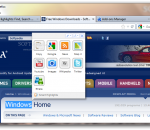
Surf the web faster with Smart Highlights. Simply highlight any word or phrase on any webpage and get more information about that topic instantly. With Smart Highlights you are never more than a click away from discovering websites, videos, images, news, Wikipedia articles and tweets on Twitter. Learning more about a topic has never been easier! You can even watch videos and preview images without leaving the page you are on. With Smart Highlights, you'll find your way around the web faster. It will change the way you surf the web!
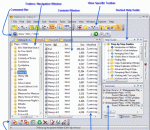
FileBoss provides the power and flexibility to manipulate files needed by professionals and demanded by today's large and intricate file systems. Providing tools to put you in control of your files and folders, whether it's renaming 1,000's of entries, replicating a tree structure without its files, intricate copying or performing many other tasks, FileBoss performs ordinary, and many not-so-ordinary, tasks in an extra-ordinary fashion.
Remote Files Server Edition is special Windows software that helps to organize simultaneous access to shared files on a server computer from different computers in your local network and from the Internet. It gives you the following advantages. Overview Download Buy Now Technical Articles Support & Feedback Technologies & Innovations Partner Program Some benefits of using Remote Files Server Edition: 1. It saves your money. It runs well on both server and non-server operating systems from Microsoft. It is independent to limit of connections (10 per time) that non-server systems have. Remote Files SE ($60) can help saving about $800 on difference between 2008 Server and Vista prices. 2. Remote Files SE creates easy-to-use web server on the server computer. All operations are performed in usual for online services manner: login, remote file operations, logout. Each supported command has corresponding icon and/or hyperlink and is easy to find. 3. Files can be accessed from the Internet (if necessary). Network administrator should perform one easy action to open access from any computer in the Internet. 4. One installed copy of Remote Files SE can serve unlimited number of user accounts with configurable rights. One person (or group of people) can have access to numerous folders on different drives. Possible rights can vary from full access (download, upload, delete, copy/move files on server) to no access to files (just viewing directory listing). So, one copy of this software can grant access to administrators, employees, sales persons and clients. 5. The software has remote administration feature. Administrator (being, for example, out of office) can remotely manage Remote Files SE from any web browser. 6. You can change online interface to correspond to your company standards. For example, you can replace SMRKsoft logo by your logo. This may be useful to embed online interface of the software into your order process, thus giving an ability to upload clients’ files to the server to complete the order. 7. Remote Files SE can continuously test its state and restart itself in any troubles. It restarts in time and “gently” (no connected users are logout). 8. Free future updates. Purchasing Remote Files SE entitles you to get all future releases (including major versions) for free. Remote Files Server Edition: main features Provides direct secure access to folders and files on a server where it is running Remote user needs only web browser for all operations Files are transferred by secure HTTPS (or non secure HTTP, if configured) connection after authentication No intermediate servers required. During session you communicate directly with your server You can get folder with all contents as zip archive by one click Supports simultaneous access of several users Administrator can manage user accounts and the program configuration remotely by the web interface Provides online registration form for new users
CleanMail is a complete SMTP/POP3 email security solution (Anti-Spam/Anti-Virus) that works with any mail server like Microsoft Exchange 2003/2007/2010, Microsoft Small Business Server (SBS) 2003/2008, Lotus Notes/Domino or IMail. CleanMail includes a comprehensive set of filters, including an attachment blocker, remote blacklist filter (DNSBL), and a complete Windows build of the award-winning, open-source SpamAssassin filter.
NETEagle is an award winning tool that optimizes your modem connection. Your internet connection can be optimized up to 200% or higher by using NETEagle. NETEagle supports all current Windows versions, and works with any internet connection. NETEagle optimizes internet related settings, allowing for faster throughput. NETEagle has been tried and tested on numerous machines and has been found to work over 99% of the time to increase your download speeds. NETEagle is a tool that optimizes your modem connection. Your internet connection can be optimized up to 200% or higher by using NETEagle. NETEagle also makes your dial-up connection more stable and more resistant to hang-up's and disconnects. This means you can download and surf the internet faster than ever before. NETEagle supports all current Windows versions (i.e. Windows 95/98/98SE/ME/2000/XP/2003/Vista), and works with any internet connection like 14.4/28.8/33.6/56 Kb, ISDN, cable, DSL, ADSL, LAN, wireless and satellite modems. No installation or modification needs to be made to your hardware. NETEagle optimizes Internet/Network related settings on your end of the connection (your PC) as well as several configuration files. However, those are not the only changes made to your computer. NETEagle also allocates a small portion of your computer's memory to the processor to process data coming from and to your modem allowing for faster throughput. NETEagle has been tried and tested on numerous machines and has been found to work over 99% of the time. Increase your download speeds and stop dealing with slow internet connections when playing online games, streaming music, audio and video with NETEagle. NETEagle is quite easy to use and understand. With a few mouse button clicks and setting changes the application is ready to work. After the settings have been made, you will need to reboot your computer and your computer's modem will be ready to use at optimal performance. Note that it is a program that optimizes your end of the connection, and you will still be dependent on the feed that your ISP provides.
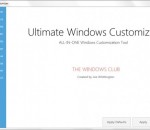
Regular readers of The Windows Club, may be familiar with our several Windows freeware releases. The one common thing among them all was that they were all small portable apps which did not require an install. But this one is different! It does a lot, is a 10 MB download, and requires to be installed.
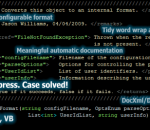
Atomineer Pro Documentation for Visual Studio 2013/2012/2010/2008/2005 auto-generates/updates DocXml, Doxygen, JavaDoc, Qt comments for C#, C++, C++/CLI, C, Java and VisualBasic code elements, using naming of items to derive automatic documentation, minimising the effort involved in keeping code documentation in sync with code and up to date. It provides unsurpassed documentation features, and is simple to use, powerful and highly confiigurable.
Keep your files,programs and PC secure with reliable,easy to use protection that's totally free. All-in-one malware defense, advanced firewall, anti-spam, and powerful data leak prevention combine to deliver robust, bullet-proof security for individuals and families. New ver. 7.1.1 adds System and Application Guard to protect your operating system and installed software against hijacking. It's the 1st completely free full-function security suite
The Microsoft® .NET Micro Framework is a platform that enables developers to more quickly develop embedded systems that are smart, securely connected, and easier to manage. With the version 3.0 release, the .NET Micro Framework enables developers to create powerful embedded systems that are more securely connected through a variety of wired and wireless protocols.
SPYOME lets you monitor your network. The software keeps a log of all the keystrokes which you type besides capturing the screenshots of each activity. SPYOME can record passwords, emails, show the screenshot at a specific hour. SPYOME can show a live ot the user session and start the remote webcam. SPYOME has been designed to run on your local network or on internet. From your computer, you can see the activities of remote computers.
GOM Media Player The only media player you need - for FREE! Not only is GOM Media Player a completely FREE video player, with its built-in support for all the most popular video and Media Player formats, tons of advanced features, extreme customizability, and the Codec Finder service, GOM Media Player is sure to fulfill all of your playback needs. With millions of users in hundreds of countries, GOM Media Player is one of the world`s most popular video players. Whats New : Added "Touch Setting" feature for touch screen devices. Added "Search box" feature on playlist. (Ctrl+F) Supported "HTTPS URL" for youtube or net radio playback. (Ctrl+U) Added "Music Tap" on preferences related to play music files. Improved performance related to "speed of add & delete" of files on playlist. Other miscellaneous corrections, fixes, and changes
Iperius Backup is one of the best free backup software, also released in commercial editions for those who need advanced backup features for their companies. The freeware version of Iperius Backup allows you to backup to any mass storage device, such as NAS, external USB hard drives, RDX drives, and networked computers. It has comprehensive scheduling and e-mail sending functions. It supports zip compression with no size limit, incremental backup, network authentication and the execution of external scripts and programs.
Maryfi is a free and easy to use software router for Windows 7, 8 , and 8.1 computers. With Maryfi, users can wirelessly share any Internet connection such as: a cable modem, a cellular card, or even another Wi-Fi network. Other Wi-Fi enabled devices including laptops, smart phones, music players, and gaming systems can see and join your Maryfi hotspot just like any other Wi-Fi access point and are kept safe and secure by password-protected WPA2 Encryption.