This extension for Google Chrome removes Facebook ads, Flash animations, and ads from all over the web.Blocks ads from downloading on all websites. It works without any configuration -- while advanced users can still create custom filters and subscribe to arbitrary filter lists.
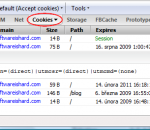
Firecookie is a an extension for Firebug that makes possible to view and manage cookies in your browser. Apart from all the other cookie managers and viewers available as Firefox extensions, this one is made as an extension for Firebug, so web developer has the functionality accessible within familiar Firebug's UI. Once Firecookie is successfully installed you should see a new tab within Firebug's bar called simply Cookies. This tab displays a list of all cookies associated with domain of the currently displayed page. Each entry in the list displays basic information about a cookie (name, value, domain, path, expire date, etc.). Inspect Cookies Every cookie in the list is expandable. This is useful especially when the cookie value is long and can't be fully displayed directly. If you are looking for a specific cookie by name, use Firebug's search box and write down it's name. The list is dynamically filtered as you type in the box. Cookie Permissions You can also manage cookie permissions for the current site directly from the Firebug's toolbar. The permission button displays the current status as a label and it's automatically updated if the permission is changed (e.g. from the Firefox options dialog). Cookie Events If you want to see when something happens to a cookie, use Firebug's Console tab. Firecookie creates a log entry every time when a cookie is created, changed, deleted or rejected. This can be switched off in Cookie->Options menu. Cookie Expire Time Cookie expire time is displayed using local timezone and current Firefox locale. It's easy to figure out the actual value. It's also possible to change the current value using a popup calendar and time picker. Both calendar and time-picker has been introduced in Firefox 3. Export Cookies Use Cookies menu to create new and remove an existing cookies. The same menu can be also used to export all cookies in the browser or only those that are associated with the current page into cookies.txt file in standard text format (every cookie + info takes one line).
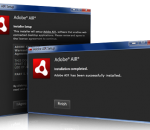
The new Adobe AIR runtime enables Ajax developers to build rich Internet applications (RIAs) that deploy on the desktop. AIR applications run across operating systems on the WebKit HTML engine and are easily delivered using a single installer file. With Adobe AIR, Ajax developers can use their existing skills and code to build responsive, highly engaging applications that combine the power of local resources and data with the reach of the web.
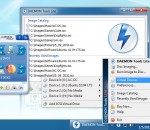
An advanced application for Microsoft Windows which provides one of the best optical media emulation in the industry. DAEMON Tools enables you to convert your physical CD/DVD discs into "virtual discs" so called "images". It also emulated up to 4 virtual CD/DVD drives, so you can mount (insert) and unmount (eject) images.
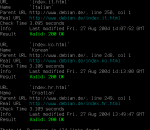
LinkChecker is a simple, very easy to use application specially designed to help you check websites and HTML documents for broken links.
Free MP4 Video Converter Factory is a useful Video to MP4 Converter that can convert various video formats to MP4 video, and it is an all-in-one video to MP4 devices converter, can convert video to iPad, iPod, iPhone, Apple TV, BlackBerry, PSP, PS3, Sony Walkman and other MP4 players. The most important is, it's 100% FREEWARE and no any hidden fees. Although Free MP4 Video Converter Factory offers super fast video converting speed, stable converting process and excellent video quality. It can still make room for other processes and applications that may be running at the time the program is in use. Its additional features enable you to convert videos more flexibly. For example, it allows you to control all video/audio parameters to adjust video quality. And it is very easy to use. With its intuitive user-interface lets you convert video to MP4 without extra tutorials.
Watch for your new inbox Gmail and report to you in status-bar. Check Gmail at specific interval ( 5 min, 10 min, 15 min, 20 min, 30 min, 1 hour, 2 hour, 3 hour, 4 hour or manually). Can select to alert by sound, by notification window or by blinking icon. Use secure protocol - HTTPS-SSL to connect to Gmail server. Safe from eavesdroppers and man-in-the-middle attacks. In order to ensure user privacy, no sensitive data is stored, you will not even be required to specify your username and password. This extension use Browser cookie to get information. So, security level is the same as Gmail website security. This extension work only after you log on at the Gmail website. As long as you stay log on, this extension still work. If you log out from Gmail website, this extension log out too ! Private browsing mode compatability. "Gmail Watcher" will not leave any traces after you stop private browsing.
JCreator is a powerful IDE for Java JCreator is the development tool for every programmer that likes to do what he does best: programming. It is faster, more efficient and more reliable than other Java IDE’s. Therefore it is the perfect tool for programmers of every level, from learning programmer to Java-specialist. JCreator provides the user with a wide range of functionality such as : Project management, project templates, code-completion, debugger interface, editor with syntax highlighting, wizards and a fully customizable user interface With JCreator you can directly compile or run your Java program without activating the main document first. JCreator will automatically find the file with the main method or the html file holding the java applet, then it will start the appropriate tool. JCreator is written entirely in C++, which makes it fast and efficient compared to the Java based editors/IDE's. Features: Manage projects with ease in an interface that is much like Microsoft Visual Studio. Define your own color schemes in XML for unlimited ways to organize your code. Use JCreator to wrap around your existing projects and use different JDK profiles. Get down to writing code quickly with our project templates. Make viewing your project a breeze with our class browser. Debug with an easy, intuitive interface. No need for silly DOS prompts! Walk through our wizards and cut to the chase of writing your project quickly and easily. Manage and exchange your code with our Ant and CVS integration. Save valuable time on Classpath configuration; let JCreator do it for you. Customize our user interface the way that you like it. Set up your own run-time environments to run your application as an applet, in a JUnit environment, or in a DOS window. Experience the satisfaction of faster speed, yet lower system requirements than with other IDEs.
This application is for drawing basic shapes .It also provides a feature to choose stroke thickness, border color, ,fill color and handwriting recognition. It allows to save the recognized text as text file and only ink strokes can be saved as image.
Excelsior JET is a toolkit and complete runtime environment for optimizing, deploying and running applications written in the Java programming language. The JET Optimizer enables you to convert your application's classes and jars into optimized x86 (IA-32) code on the developer's system. As a result, you get high performance native executables for Microsoft Windows or Linux.
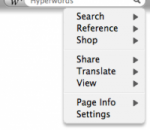
Hyperwords is designed to support academic, corporate, consumers and knowledge workers in general. A basic function of Hyperwords is to select text on a web page and make it easy to get other information about the text. You are no longer restricted to following only the links others have made for you. Selecting text is simple: either double-click on a word, double-click between two words (like in a name) to select both, or stripe/drag-select a larger selection of text. References If for some reason you want to find out who the prime minister of Kazakhstan is, just select Kazakhstan and select 'References' from the menu that pops up and then select 'Wikipedia' from the sub-menu. You should now be seeing the Wikipedia entry open in a new window to the left of your main window. You can even get the result right inside the menu, just hover over 'Wikipedia' (or any other reference or many searches, such as 'people' or 'pictures'). More There are other kinds of commands in Hyperwords, it is not just about references or searching. Please have a look at some of the tutorials above to learn more. To perform a quick Google search, just select text on the page and hit 'enter'. Conventions used in this Tutorial Words in italic are words we suggest you try commands on.
GOM Media Player The only media player you need - for FREE! Not only is GOM Media Player a completely FREE video player, with its built-in support for all the most popular video and Media Player formats, tons of advanced features, extreme customizability, and the Codec Finder service, GOM Media Player is sure to fulfill all of your playback needs. With millions of users in hundreds of countries, GOM Media Player is one of the world`s most popular video players. Whats New : Added "Touch Setting" feature for touch screen devices. Added "Search box" feature on playlist. (Ctrl+F) Supported "HTTPS URL" for youtube or net radio playback. (Ctrl+U) Added "Music Tap" on preferences related to play music files. Improved performance related to "speed of add & delete" of files on playlist. Other miscellaneous corrections, fixes, and changes
Iperius Backup is one of the best free backup software, also released in commercial editions for those who need advanced backup features for their companies. The freeware version of Iperius Backup allows you to backup to any mass storage device, such as NAS, external USB hard drives, RDX drives, and networked computers. It has comprehensive scheduling and e-mail sending functions. It supports zip compression with no size limit, incremental backup, network authentication and the execution of external scripts and programs.
Maryfi is a free and easy to use software router for Windows 7, 8 , and 8.1 computers. With Maryfi, users can wirelessly share any Internet connection such as: a cable modem, a cellular card, or even another Wi-Fi network. Other Wi-Fi enabled devices including laptops, smart phones, music players, and gaming systems can see and join your Maryfi hotspot just like any other Wi-Fi access point and are kept safe and secure by password-protected WPA2 Encryption.