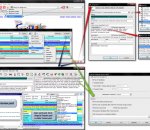
Ghostery sees the invisible web - tags, web bugs, pixels and beacons. Ghostery tracks the trackers and gives you a roll-call of the ad networks, behavioral data providers, web publishers, and other companies interested in your activity. After showing you who's tracking you, Ghostery also gives you a chance to learn more about each company it identifies. How they describe themselves, a link to their privacy policies, and a sampling of pages where we've found them are just a click away. Ghostery allows you to block scripts from companies that you don't trust, delete local shared objects, and even block images and iframes. Ghostery puts your web privacy back in your hands.
Stylebot is a very useful Chrome extension designed to simplify the web customization, making it more accessible and adaptable. It puts you in control of the web's presentation, allowing you to quickly change the appearance of any page. FEATURES: · Simple & Quick: Resulting changes are shown and saved instantly · Styles are saved persistently, so the next time you visit the same page, they're already applied · Easy to use: No need to write CSS · Easily make sites more accessible by changing colors, font size, etc. · Sync your custom styles across multiple computers
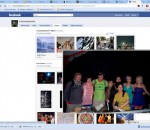
Facebook Photo Zoom is a Google Chrome extension that integrates directly into Facebook, so you can see the larger images of photo albums, profile photos and more whenever you hover over a zoomable image.
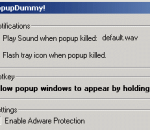
Easy to use and no setup needed. PopupDummy! popup killer provides real-time protection from popups, adware, spyware, harmful web browser plug-ins, harmful activex installers, drive-by downloads, and web browser hijackers. PopupDummy! not only protects your PC from popups, it also stops adware and spyware from running, and keeps them from ever installing in the first place. PopupDummy! keeps a watchful eye on any hidden programs running on your PC. You're notified instantly when a harmful task is blocked. By blocking drive-by downloads and harmful activex controls as your surf the web, you're safe from new spyware pests which try to install on your PC. Harmful web browser plug-ins and toolbars are also blocked, and web browser hijackers are cleaned. PopupDummy! gives you complete control over any attempts at customization of your web browser and ultimate protection against popups. PopupDummy! is compatible with Windows 95/98/ME/NT/2000/XP, Microsoft Internet Explorer, and Netscape web browsers. PopupDummy! users receive same-day customer support, FREE upgrades, and no monthly/yearly subscription fees.
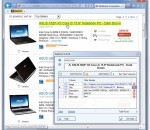
Single click screen scraper, web data mining and web data extraction tool. Data ToolBar is a web data extraction software, web scraping utility to collect catalog style information from the web. Implemented as an Internet Explorer add-on, it converts web page data into a table style format that can be loaded into a spreadsheet or a database. Based on powerful pattern recognition logic it automatically extracts thousands of data records and images from free or subscription web sites. DataTool is designed for everyday business users and requires no programming skill. No scripts to write. Just point to the data fields you want to collect and the wizard does the rest for you. The web scraper is a must-have for anybody who needs to collect the large amounts of data from the Web. Real estate listings, online auctions, classifieds, social networks, price lists and White pages are typical examples of web pages that you can turn into a useful data source. Data Toolbar can help you easily automate web data extraction without any programming.
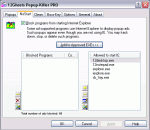
Free Popup-Killer that blocks ALL popups of IE. Extended Boss-Key included. Block ALL pop-up windows opened by Internet Explorer, both, those that are opened automatically by a script as well as links that open a new window. -> NO black list you need to maintain -> NO loop that uses CPU resources when waiting for new windows -> NO hook into message loops what would slow down your machine -> Integrated into Internet Explorer, prevents pop-ups BEFORE they are created -> Contents of pop-ups is NOT downloaded from the Internet, thus saving you bandwidth -> Eradicates pop-ups root and branch! Also features a boss-key for any application, for example browser, media player, picture viewer, or instant messenger. A history cleaner for Internet Explorer is included that removes history, cookies, and temporary cached files, as well as Windows history lists and temporary files.
Integrating with the latest versions of Google Chrome, Firefox, Internet Explorer, and Opera browsers, Linkman gives you the power to efficiently organize bookmarks and favorites! Linkman is a standalone, browser independent bookmark organizer and search tool. Add links from browsers, and Linkman will retrieve keywords and descriptions automatically! Not only can Linkman organize your bookmarks, it can also help you detect and eliminate duplicate links from your bookmark collection. You get the choice to organize your bookmarks by keywords only, folders only, or folders and keywords. Linkman stores bookmarks in XML databases, and is well known for providing 15 years of bookmark data security. It's constantly improved and receives several updates every year. Linkman is a bookmark organizer which provides uniform access to bookmarks and favorites across browsers. If you add a bookmark in Internet Explorer, you can access the new bookmark also in Firefox, Google Chrome, Opera and vice versa. You get also the ability to import your existing bookmarks into Linkman from all browsers. Linkman is the only bookmarks organizer that is able to maintain the correct IE Favorites order and import Firefox bookmarks including both tags and keywords! Linkman supports up to 10 different import formats and you can even parse any file for bookmarks. In the search window Linkman uses wildcards and operators to combine search terms. AND (DEFAULT), OR, AND NOT and the '-' sign can be used. Example: a search for backup software -usb will find all links containing the keyword backup AND the keyword software, but NOT containing the keyword usb.
Portable Offline Browser is an offline browser/downloader. It can be installed to a Flash/USB drive and run directly from it. You can plug the drive with the installed Portable Offline Browser into any Windows system and use it with no need to adjust settings. All your Projects and downloaded files will be there! And when you unplug, none of your personal data is left behind. Portable Offline Browser lets you take the web site with you when you travel with your laptop computer. When the flight attendants ask everybody to disconnect from the Internet, you still have your web sites on your hard drive. Even if the online content moves or changes, your files are still intact. You can even save streaming audio and video files to your hard disk, and play them back at the highest quality. And its powerful export feature allows you to share and transfer files, or burn them to CD in normal or Autorun mode. Best of all, the downloaded web sites can be viewed on Windows, Macintosh, and Linux computers. Save Streaming Audio and Video for Viewing Offline There are lots of audio and video streams available, but you can`t save them to your disk within your browser, Media Player or Real Player. Portable Offline Browser can do this for you. Simply give it RTSP://, PNM:// or MMS:// URL and watch the file from your hard disk. You can also download the file with the highest possible quality even on a slow modem Internet connection. Convenient Office-2010 like interface provides more flexibility while working with Offline Explorer. The lower part of the main screen enables you to monitor and control your downloads. Download Monitor shows all downloading channels and their activity. System Monitor - contains charts to see CPU, memory usage, free disk space, and download speed. Log - shows all details of the download activity, internal server access, etc.
QrCodeR is a Firefox extension designed to convert text selections, links and images to QrCode by right-clicking the elements. USAGE: Right-click the link or image of interest, select one of the options and QrCodeR will display the generated barcode.
Bring some anime to your browser with this theme for Firefox. Includes a cool theme and built in links to your favorite sites..
Do you own a site that needs more visitors and sales? Are you struggling to get ranked higher in Google, Yahoo and Bing, but your competition is always one step ahead? Have you tried to optimize your site? Did you know exactly what should be done? Or did you simply give up and investing now hundreds to thousands dollars a week in Pay Per Click ads? Well, consider your problems solved now!. Get a top #1 ranking on Google, Yahoo and Bing with the cheapest but highly effective small business SEO. Visit homepage to learn more.
Adobe Shockwave Player Over 450 million Internet-enabled desktops have Adobe Shockwave Player installed. These users have access to some of the best content the Web has to offer - including dazzling 3D games and entertainment, interactive product demonstrations, and online learning applications. Shockwave Player displays Web content that has been created using Adobe Director.